

File Access and Sharing
Normal file URLs do not expire. By default, anyone with the URL can read the file. Use an access policy to require an API key. Use a temporary link to limit how long that link works, with or without an API key. Expiry does not delete the file.
Confirm that your deployment and SDK support these options. Updating the SDK does not enable file protection on a server that has it disabled.
Create an access policy
These examples use an authenticated GroundX Python client named client.
The policy has two optional settings. Supply one or both:
mode:"protected"requires an API key for normal file URLs."public"does not.url_ttl_seconds: the maximum lifetime of a new temporary link. It does not make normal URLs expire or delete stored files.
The default is public access with a 300-second maximum for temporary links. A configured lifetime can be 1 to 604800 seconds (7 days).
Which settings apply
For each setting, GroundX checks the document first, then its bucket, then the account. The first value found wins. If none is set, GroundX uses the default.
For example, a bucket that sets only a 60-second link lifetime still uses the account’s public/protected setting. A document explicitly set to public is public, even if its bucket is protected.
A temporary link uses the authentication choice made when it was created. It can share a protected file without a key, or require a key for a public file. Its requested lifetime cannot exceed the policy’s maximum. Other URLs are unaffected.
Apply or change a policy
Account
Use account settings when the rule should apply across the account:
Bucket
Use bucket settings when a collection needs a different rule:
For an existing bucket:
Document
Use document settings for an individual exception. Set them during ingest to protect the file from the start:
Check the individual document status before using its results. For a remote file,
use its URL as file_path and supply file_name and file_type. GroundX must be
able to read that URL. The policy cannot protect a copy on another website.
For an existing document, use its saved document ID:
Change one document’s policy per request. Do not combine it with metadata, rename or callback changes. Changing a policy does not rerun processing.
A new policy replaces that resource’s previous settings. On update, leaving out
file_access makes no change. Use None to remove the settings.
Remove settings
Remove account settings to use the public system defaults:
Remove bucket settings to use the account settings:
Remove document settings to use the bucket and account settings:
Removing a setting can make files public. Check the resulting settings:
file_access shows what you set on that resource. effective_file_access shows
what GroundX actually uses after checking the document, bucket and account.
Share a file, page or crop
To share the original file for 60 seconds without requiring a key:
Give the recipient link.url. It stops working at link.expires_at. Anyone with
this link can use or forward it until then, even if the file is protected.
Set require_authentication=True to require an API key from the owning account
as well. An expired link fails even with a valid key. Leave this argument out to
keep the existing storage-signed sharing behavior, which also needs no GroundX key.
Revoking a key or changing a policy does not cancel an existing storage-signed link.
AssetSelectorZero is the SDK type for original files, X-Ray and extraction output.
The file-link API also accepts these saved-file selectors:
Page numbers start at 1. Chunk indices start at 0 within a page. Use a chunk ID
or a page and chunk index, not both. GroundX only shares files the account owns;
it does not sign arbitrary URLs. The operation is
POST /v1/ingest/document/{documentId}/file-link and returns {url, expiresAt}.
Read a protected file
Read a protected URL from your server with X-API-Key:
Use only HTTPS URLs on your configured GroundX file hosts. Do not send keys to
other hosts, across redirects, in query strings or in browser code. Delegated
Partner requests also use X-Customer-Key to select the customer.
A browser address bar or image tag cannot add these headers. Use your backend to read the file, or issue a temporary link that does not require authentication. An MCP login token cannot authenticate a file download.
Upload source files
client.ingest() uses the configured GroundX API to upload both public and
protected files, including on-prem. For a protected file in a public bucket,
supply its policy during ingest, before the bytes are uploaded.
For direct API integrations:
- Call
POST /v1/bucket/{bucketId}/file-uploadwithfileName,fileTypeand any initialfileAccesspolicy. The API checks the policy before allowing upload. - The
201response suppliesuploadUrl,hostedUrl,expiresAt,methodandheaders, plus anuploadId. - PUT the bytes to
uploadUrlwith the returned headers. Send no GroundX key to storage. Finish beforeexpiresAt, at most 900 seconds after issuance. - Ingest
hostedUrlinto the same account and bucket with the same file policy. Protected uploads must be submitted before expiry; later processing can finish afterward. Public uploads remain ingestible after their upload link expires. - Poll the returned process ID and check each document’s result.
If a protected upload expires before submission, request a new upload link and upload again. Do not upload publicly as a fallback. Split files and crawled pages keep the initial policy. An existing document ID keeps its saved policy; use the update operation to change it.
X-Ray and search links
An X-Ray download shares the JSON only. It does not grant access to the files referenced inside it.
For protected documents, xrayUrl includes ?view=links. An authenticated GET
returns the X-Ray with fresh links to its source, pages and crops. It does not
change the stored X-Ray. This view requires authentication even for public files
and does not support range or conditional requests. Without ?view=links, the
URL returns the stored JSON. Keep that raw version when exact bytes matter.
Protected search results can contain temporary source, page and crop links.
Keep the document, page and chunk IDs so you can request a new link when one
expires. You can also repeat the search or fetch xrayUrl again. Do not change
the file policy to repair an expired link.
Hosted file delivery
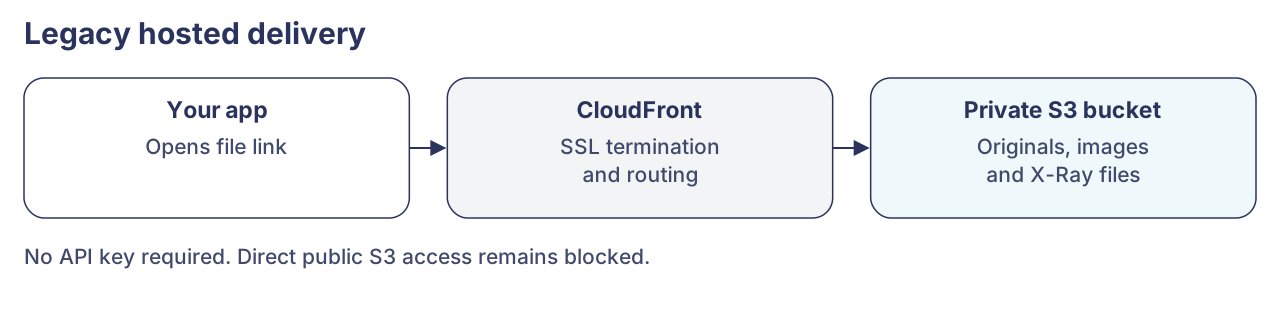
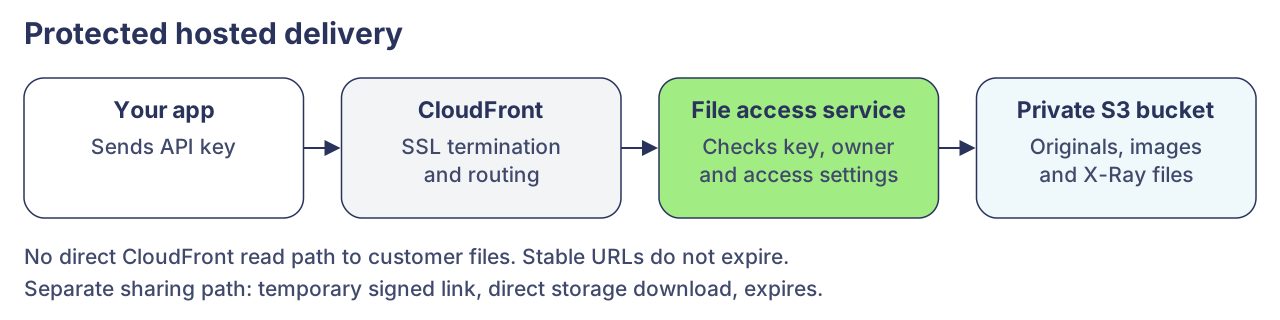
CloudFront handles SSL termination and routing. The file access service checks permissions before reading private storage. Approved temporary storage links can read storage directly until they expire.
Before:
After:
On-prem uses its configured file service and storage. It does not need CloudFront.
Errors and deployment prerequisites
When file protection is disabled, policy writes return 403 and file-link
issuance returns 404. Upload issuance still works without a policy. Explicit
require_authentication also needs the operator’s signing-key setup. Rotating
that key cancels links issued with it. Storage credentials can shorten the
lifetime of older storage-signed links.
On-prem needs compatible API, worker and file-service images, private storage, HTTPS and shared database/cache settings. Test the actual storage version: hosted S3 tests do not establish MinIO, AIStor or S4 support. See on-prem setup and on-prem troubleshooting.